Instagram is one of the most popular social media apps in the world.
This app lets users share their lives, keep in touch with friends and family, and helps businesses build their brands and market their products and services to the world.
Here, we’ll show you how to pin and unpin a comment on Instagram in a few simple steps!
What is a pinned comment on Instagram?

how to pin a comment on instagram
A pinned comment will be the first visible comment that users will see when they click on your Instagram post.
Benefits and purposes of pinning a comment
- Users will always see the most important comment first.
- Important comments won’t get lost in the comment section.
- You can get important messages across easier.
- You can highlight relevant questions, concerns, or comments from customers or followers.
- You can pin your favorite comment on a post to engage with your followers.
- Allows you to pin customer testimonials to showcase your products in a good light.
- Pin a comment with a link to redirect your followers to a specific page.
How to pin a comment on Instagram
Follow the steps below to get started:
Steps to pin a comment on Instagram for Android users
If you’re an Android user, follow the steps below to pin a comment on Instagram:
- Open the Instagram app.
- Click on the post with the comment you want to pin.
- Tap the comments button, which looks like a speech bubble.
- Swipe left on the comment you want to pin to the post.
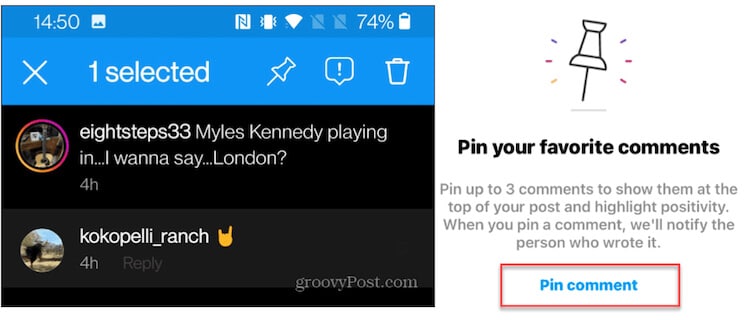
- A toolbar will appear at the top of your Android device, as shown in the photo below.
- Tap the pin icon, and you’ll receive a notification detailing how you can pin up to 3 comments per post and that the user will be notified of the pinned comment.
- Click “Pin comment,” and you’re done!
Steps to pin a comment on Instagram for iPhone users
Pinning a comment on Instragram for iPhone users is virtually the same process, just with varying icons.
To pin a comment on Instragram using the iPhone, follow the steps below:
- Open Instragram.
- Tap the post with the comment you want to pin.
- Click the comments button.
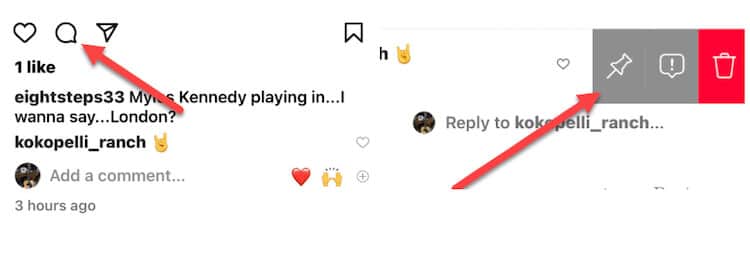
- Once the comments open, swipe left on the comment you want to pin.
- Tap the pin icon to the left, shown in the image below.
- When you tap the pin icon, you’ll get a notification letting you know that you can pin 3 comments and that the user will be notified that their comment has been pinned. Click “Pin comment” to complete the pin.
That’s all it takes!
- Pin comments that will provide value to your followers, such as comments with links, questions, concerns, or misinformation that you’ve addressed.
- Pin comments that showcase your product or service and how much customers like them.
- If you’re an influencer, pin comments that you like from fans to interact with your followers and make them feel appreciated.
- Pin comments about special deals, offers, or discounts on products.
- Avoid pinning negative comments to embarrass or call out users. Keep your page positive.
By following these tips, you can improve engagement on your Instagram page, build a positive community, and keep your business transparent.
How to unpin a comment on an Instagram post
Steps to unpin a comment on Instagram for Android users
To unpin a comment on Instagram for Android users, simply:
- Tap and hold the pinned comment you want to remove. The toolbar will appear.
- Click the pin icon. A notification will appear asking if you want to unpin the comment.
- Tap, “Unpin.”
Unpinning a comment is quite literally as easy as 1-2-3!
Steps to unpin a comment on Instagram for iPhone users
To unpin a comment on Instragram as an iPhone user, follow the steps below:
- Swipe left on the comment you want to unpin.
- Tap on the pin icon. You’ll receive a notification asking if you want the comment to be unpinned.
- Tap, “Unpin.”
That’s all you have to do!
Why Can’t I Pin My Comment On Instagram?
Keep in mind that the person whose comment you’re pinning will be notified that you’ve pinned their comment.
Conclusion
You should now know how to pin a comment on Instagram!
